Slendergrey: How to Use an Elegant Slender Font Without Common Mistakes
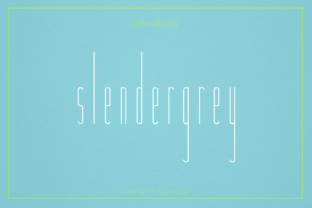
Choosing the right typeface is one of the most impactful decisions a designer makes. It sets the emotional tone, influences readability, and communicates brand values without saying a word. Slendergrey has quickly become a favorite for designers aiming for a sleek, modern, and undeniably luxurious aesthetic. Its slender, elegant strokes evoke a sense of refined minimalism that works beautifully for magazines, high-end branding, and sophisticated titles.
However, achieving that polished look isn't just about downloading the font and typing away. Many users, from experienced designers to enthusiastic beginners, fall into predictable traps that turn an elegant tool into a usability nightmare. Let's walk through the most common missteps with Slendergrey so you can harness its elegance without sacrificing readability or professionalism.
Mistake #1: Forgetting That "Slender" Requires Extra Space
The very feature that makes Slendergrey beautiful—its narrow, airy letterforms—is also the primary source of layout problems. Because the characters are slender, the default tracking (letter-spacing) and leading (line-spacing) in standard software can make text look cramped or, conversely, disconnected.
Imagine using Slendergrey Light for a product description. If you leave the default tracking at 0, the letters might feel too tight, reducing the luxury feel. If you increase tracking too much, the words lose their cohesion. In software like Adobe InDesign or Illustrator, you can access the Character panel to fine-tune this. A common starting point for Slendergrey headlines is +30 to +50 tracking, but always trust your eyes. For body text, stick to neutral or slightly open tracking. More importantly, increase the leading by 2-4 points compared to a standard sans-serif. This gives each line room to breathe, preventing the "grey wall" effect and maintaining readability at smaller sizes.
Mistake #2: Using Slendergrey for Long-Form Body Copy
Beginners often fall in love with the style and try to use Slendergrey for everything, including lengthy paragraphs. This is a natural temptation when a font looks so good in a specimen, but it overlooks a fundamental principle of typography: function follows form.
Slendergrey is, at its heart, a display face. Its slender strokes, especially in lighter weights, become difficult to read at 10 or 12 points over several sentences. Eye fatigue sets in quickly, and your reader will disengage, no matter how beautiful the page looks. A product description of two to three lines in a magazine layout? That is a perfect use case. A 500-word blog article or a lengthy product manual? Definitely not the right application.
Reserve Slendergrey for headlines, subheadings, pull quotes, and short introductory blurbs. For long body copy, pair it with a highly legible serif like a nice Garamond or Georgia, or a sturdy sans-serif like Open Sans or Lato. This creates a dynamic hierarchy and ensures reading comfort. If you absolutely must use Slendergrey in body text, stick to the Regular or Medium weight, never Light, and keep your column width narrow to reduce eye strain.
Mistake #3: Ignoring Font Weights and Pairing Dynamics
Slendergrey often comes in multiple weights, such as Light, Regular, Medium, and Bold. A common mistake is using the wrong weight for the wrong purpose, or worse, using only one weight for an entire project. Using Slendergrey Bold for a delicate fashion magazine header might overwhelm the elegant vibe, while using Slendergrey Light for a corporate report title might lack the necessary authority.
Build a clear typographic scale. Use Light for large, spacious headers to maximize the elegant, luxury feel. Use Regular or Medium for subheads or shorter paragraphs. Use Bold sparingly for emphasis or strong calls to action. When pairing, avoid fonts that compete. Do not pair Slendergrey with another narrow, avant-garde typeface. Instead, opt for contrasting shapes—a round sans-serif like Nunito or a classic serif like Playfair Display—to create visual tension and balance. If you are designing a wedding invitation, pairing Slendergrey with a script font can be stunning, but ensure the script isn't too ornate or it will clash with Slendergrey's clean modernity.
Mistake #4: Overlooking the Technical Fine Print
You find the perfect Slendergrey variant online, download it quickly, and start designing. Suddenly, your commercial project is flagged, or your web font doesn't render properly on mobile. This is a frustrating but entirely avoidable scenario.
Before clicking "buy" or "download," read the foundry's licensing page thoroughly. Is it a personal license or a commercial license? Many elegant fonts have strict licensing for logo usage, app embedding, or website @font-face use. Using Slendergrey without the correct license can lead to costly legal issues and wasted design time. Also, verify the file formats you need. Do you require OTF, TTF, WOFF, or a variable font? If you are a web developer, variable font formats are ideal for adjusting weight smoothly across breakpoints, while static fonts give you a single weight per file. Knowing which one you need saves time and money. Finally, does Slendergrey include accented characters or Cyrillic or Greek glyphs if your project requires them? Look for a comprehensive character map before making your final decision.
Mistake #5: Misaligning Slendergrey With the Brand's Voice
Slendergrey is not a neutral font. It carries a strong personality of sophistication, modernity, and restraint. Using it for a rugged outdoor brand, a children's toy line, or a heavy industrial machinery company creates a confusing visual message that undermines brand trust.
A minimalist skincare brand? Slendergrey is practically perfect for the job. Its clean lines mirror the "clean beauty" trend perfectly. A high-end tech startup or a luxury real estate developer? Absolutely. But if the brand's core value is "robust," "playful," or "earthy," Slendergrey might actually alienate the target audience. Before committing, test Slendergrey in realistic mockups. Does it look pretentious? Does it make the content feel cold or unapproachable? If so, consider a warmer, more rounded, or more expressive typeface. A great font used in the wrong context is still a poor design choice.
Practical Steps Before You Commit to Slendergrey
To ensure you get the best possible result, follow these practical steps before making a final decision:
- Test in Context: Do not just look at the font specimen. Type out your actual headline, subhead, and a paragraph. See how it looks at different sizes and on different devices.
- Check the Foundry: Buy Slendergrey from reputable sources. Beware of free versions that lack complete character sets or proper licensing for professional work.
- Review Kerning Pairs: Check the foundry's recommended kerning pairs. Some versions of Slendergrey have specific kerning issues with letters like "W" or "A" that require manual adjustment.
- Print It: Luxurious fonts often look different on screen versus paper. Print a test sheet to see how Slendergrey handles ink bleed and fine details before sending a project to production.
- Get Feedback: Show your design to someone unfamiliar with the project. If they comment on the font before the message, the typography is overpowering the content.
Why These Details Matter for Your Final Product
Using Slendergrey correctly elevates your project from "amateur" to "professional." It signals to your audience that you pay attention to detail. By avoiding the common mistakes outlined above—poor spacing, wrong context, bad pairing, licensing oversight, and brand mismatch—you ensure that the font serves your message rather than competing with it. The goal is not just to use an elegant font; it is to create a harmonious, effective, and beautiful piece of communication that resonates with a discerning audience.
Slendergrey is a powerful tool in the right hands. It embodies a specific aesthetic that, when applied thoughtfully, yields stunning results. By respecting its slender nature, understanding its technical requirements, and placing it in a context where it can truly shine, you unlock its full potential. Your audience may not know the technical details of typography, but they will feel the difference. They will perceive the content as more trustworthy, readable, and refined. Take the time to plan your typography, and Slendergrey will reward you with a polished, luxurious finish that stands out for all the right reasons.