Whenesday: Integrating a Formal Script Font Into Your Design Workflow
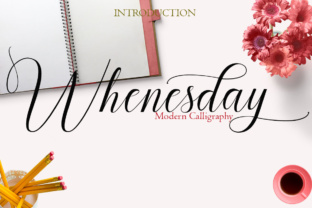
Every design project eventually reaches a moment where standard typefaces feel too neutral, too mechanical, or simply out of step with the tone you want to convey. That is where a carefully chosen script font can shift the entire visual direction. Whenesday is a handwritten script font rooted in classical calligraphy—a formal, elegant typeface that brings a handcrafted quality to digital work. With over 460 unique glyphs and 248 alternates, it offers more than just a pretty look; it provides a structural toolkit for building consistent, expressive typography across a range of real-world applications.
This article looks at Whenesday from a practical angle. Rather than focusing on decorative use alone, we will explore how to integrate it into broader creative and professional workflows—before, during, and after a project—and how it interacts with other tools, platforms, and decisions you already make. Whether you are a designer refining a brand identity, a small business owner preparing marketing materials, or a content creator building a cohesive visual style, understanding where Whenesday fits in your process can save time, reduce friction, and improve the quality of your output.
What Whenesday Brings to a Typography Workflow
At its core, Whenesday is a formal script typeface. Its letterforms draw directly from classical calligraphy, which means each character carries a deliberate stroke rhythm, consistent slant, and thoughtful spacing. That alone makes it suitable for projects where you need a polished, human-readable script—think invitations, certificates, branding headlines, packaging, and editorial titles.
But what moves Whenesday from a simple font choice to a workflow asset is its glyph and alternate set. With 460+ glyphs and 248 alternates, you are not limited to a single predefined set of characters. Instead, you have the flexibility to choose stylistic variants for individual letters, adjust ligatures, and fine-tune the overall texture of a word or phrase. This is especially useful when you need to avoid repetitive letterforms—in a headline, for instance, where two identical characters might otherwise look identical side by side. By selecting different alternates, you can create a more natural, hand-lettered appearance without redrawing anything manually.
For anyone working within a structured design process—whether you follow a formal project timeline, an agile iteration cycle, or a simple personal workflow—this level of control means you can make typographic decisions earlier and with more confidence, rather than hunting for a different font later.
Before the Project: Preparation and Asset Selection
The most effective use of Whenesday begins before you open your design software. During the preparation phase, you are making decisions about tone, audience, and medium. A formal script font communicates elegance, tradition, and attention to detail. That makes it a strong candidate for projects where you want to signal quality and care—such as a wedding invitation suite, a premium product label, or a certificate of achievement.
However, preparation also involves practical compatibility checks. Because Whenesday includes a large character set and many alternates, you need to confirm that your design software supports OpenType features. Most modern applications—Adobe Illustrator, InDesign, Photoshop, Affinity Publisher, and even web-based tools like Canva (with certain plans)—support OpenType stylistic sets, contextual alternates, and ligatures. Verifying this before you start building your layout prevents mid-project surprises.
Another preparatory step is reviewing the alternate glyphs themselves. Whenesday provides 248 alternates, which are organized into stylistic sets. Spend a few minutes scanning these sets to understand what variants are available for capital letters, lowercase letters, and common ligatures. This upfront familiarization allows you to plan which alternates you will use for key words in a headline or logo, rather than making those choices under deadline pressure.
If you are working with a team, preparing a short style guide that notes which stylistic sets you plan to use—and which alternates are reserved for specific contexts—can streamline collaboration. This is particularly useful when multiple people are contributing to the same brand assets or marketing materials.
During the Project: Placing Whenesday Into Your Active Workflow
Once the project is underway, Whenesday interacts with several recurring stages: layout, hierarchy, and refinement.
Layout and Hierarchy Decisions
Formal scripts work best when they are used deliberately. Whenesday is not a body text font—its stroke contrast and decorative quality make it more suitable for headlines, subheadings, and short text blocks where you want visual impact. In practice, that means positioning it at the top of your typographic hierarchy. Pair it with a clean sans-serif or a neutral serif for body copy, as this contrast creates a clear visual separation and improves readability.
When you set a headline in Whenesday, consider the spacing. The font includes built-in kerning, but you may still want to adjust tracking (letter spacing) slightly depending on the scale and medium. For print, tighter tracking often works well; for digital screens, a small increase in tracking can improve legibility at smaller sizes.
Using Alternates to Build Consistency
The real workflow advantage of Whenesday's 248 alternates is the ability to maintain visual consistency while introducing subtle variation. For example, if you are setting a multi-word headline, using the same alternate for repeated letters—such as the letter "e"—makes the text feel cohesive. But if you are creating a single wordmark or logo, you might choose different alternates for each letter to create a bespoke, handcrafted look.
Practically, you can manage this by creating character styles or text styles in your design application that reference specific stylistic sets. In Adobe InDesign, for instance, you can define a paragraph style that applies a specific OpenType stylistic set, saving you from manually selecting alternates every time you type a new text box. This approach is especially valuable when you are working on a multi-page document or a series of social media templates.
Interactions With Other Tools and Assets
Whenesday works well alongside other design assets—illustrations, borders, icons, and textures—provided the overall style stays consistent. Because the font has a calligraphic root, pairing it with hand-drawn elements, watercolor textures, or classic ornamental borders reinforces the formal, elegant tone. Conversely, mixing it with very modern, geometric graphics can create intentional tension, but you should test that combination early to confirm it supports your message rather than confusing it.
For digital projects, Whenesday can be used as a web font if you self-host it or use a service that supports the full glyph set. Be aware that not all web font services expose OpenType alternates in the same way. If you plan to use alternates on a website, check the CSS font-feature-settings or font-variant-alternates properties to ensure the correct glyphs render. Testing in multiple browsers is essential here.
After the Project: Quality Control and Long-Term Use
Once your design is finalized, the role of Whenesday shifts into quality control and asset management. This is the phase where you verify that the intended alternates are applied correctly, that no unexpected default glyphs appeared during export, and that the font renders properly across the intended output media.
Quality Control Checklist
- Glyph verification: Check every instance of critical letters—especially in headlines, logos, and names—to confirm the correct alternate was applied. A quick visual scan often catches stray defaults.
- Cross-platform rendering: If you are producing both print and digital versions, export a PDF and a screen preview. Compare them side by side to ensure OpenType features are preserved in both formats.
- Embedding and licensing: Confirm that you have the right license for your use case—commercial desktop license for print, web font license for websites, and app license if you are embedding in a mobile or desktop application. Proper licensing avoids legal friction later and supports ongoing use.
- Backup your style settings: Save your document styles, character styles, and any alternate selections as part of your project assets. This allows you to revisit the project months later and maintain consistency without redoing the work.
Long-Term Integration Into a Brand or Workflow
If Whenesday becomes a recurring element in your work—say, as part of a brand identity, a series of event materials, or a recurring content format—consider creating a reusable font package. This package would include the font file, a reference sheet of your preferred alternates, and a short usage guide that covers pairing fonts, minimum size, and spacing recommendations. Having this on hand reduces decision fatigue each time you start a new project.
Over time, you may also notice patterns in how you use alternates. Some designers develop a personal set of preferred alternates for specific letters—for instance, a particular capital "W" or lowercase "y"—and apply those consistently across projects. That kind of personal workflow refinement is only possible with a font that offers the depth of glyphs that Whenesday provides.
Practical Implementation Tips
To help you move from reading to doing, here are a few concrete ways to integrate Whenesday into your routine:
- Start with a single use case. Pick one recurring task—like a monthly newsletter title or a client proposal cover page—and set it in Whenesday. Use alternates to create a unique look, then save that style for reuse.
- Create a test document. Before the first major project, build a simple test file that types out common words and phrases you use frequently. Apply different alternates to see how they appear in context. This gives you a visual reference you can consult later.
- Pair with a system sans-serif. A practical pairing is Whenesday for headlines and a neutral sans-serif like Inter, Lato, or Open Sans for body text. The contrast is clean and the combination works well for both print and screen.
- Use alternates for emphasis. Instead of italicizing or bolding a word, switch to a different alternate version of that word. This maintains the script feel while adding subtle emphasis—useful for call-to-action phrases or signature lines.
- Document your alternate choices. If you work with clients or a team, share a simple table that lists which alternates you used for specific letters. This prevents guesswork when others need to extend the design.
Useful Observations From Real Use
Whenesday performs best at medium to large sizes. At display sizes (48pt and above), the calligraphic stroke contrast becomes more visible, and the alternates' nuances are easy to read. At smaller sizes (below 18pt), some of the finer details may be lost, especially in digital rendering. If you need script text at smaller scales, consider increasing the tracking slightly and testing on the actual output device.
The 248 alternates are not all equally useful in every project. You will likely develop a subset of favorites—perhaps 20 to 30 alternates—that you return to repeatedly. That is normal. The value of having many alternates is not that you use them all; it is that you can choose the best one for each specific context without being limited to a single design.
Finally, because Whenesday is a formal script, it carries a certain tonality. It works well for projects that aim to feel timeless, respectful, or celebratory. It may feel out of place in contexts that require a casual, ironic, or highly modern tone. Knowing when not to use it is just as important as knowing when to use it—and that awareness comes from being intentional about your workflow choices from the start.
Moving Forward With Whenesday
Whenesday is more than a decorative font. Its extensive glyph set, formal calligraphic roots, and 248 alternates make it a practical tool for anyone who needs to produce polished, expressive typography with consistency and control. By integrating it into your workflow—during preparation, active design, quality control, and long-term asset management—you reduce the gap between what you imagine and what you can produce.
The most effective typography is not just about choosing a beautiful typeface. It is about understanding how that typeface behaves within the systems, tools, and processes you already use. Whenesday fits that definition. Whether you are refining a brand identity, designing a special publication, or building a set of reusable templates, working through your process with Whenesday allows you to focus on the content and the message, knowing the typography will support your intent cleanly and elegantly.