Using Quirky and Messy in Your Design and Craft Workflows
Typography is more than just letters on a page. It is a decision that sets tone, communicates intent, and shapes how an audience perceives your work. Among the many typefaces available, Quirky and Messy stands out as a fun, casual handwritten font that brings personality to projects without sacrificing readability. Whether you are a small business owner building a brand, a freelancer preparing client deliverables, or a hobbyist working on a personal craft, this font earns its place in your toolkit when used deliberately.
This article focuses on where Quirky and Messy fits into real workflows, how to integrate it alongside other assets, and what practical considerations matter for long-term use.
What Quirky and Messy Offers in a Practical Sense
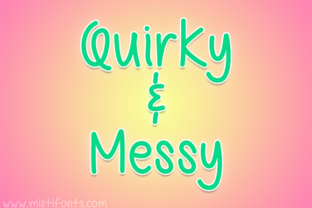
Quirky and Messy is a handwritten-style font that mimics natural, uneven letterforms. It feels spontaneous and approachable, which makes it suitable for projects where a polished, sterile look would feel out of place. Unlike script fonts that strive for elegance or sans-serif fonts that aim for neutrality, this typeface leans into imperfection deliberately.
From a workflow perspective, this font works best when you need to convey informality, warmth, or creativity. It does not replace your core body text font for reports or long-form reading, but it excels in headlines, short phrases, labels, and decorative elements. Understanding that distinction helps you plan where and when to use it without compromising readability or consistency.
Where It Fits Across Different Project Phases
Integrating Quirky and Messy into a project is not a single-step action. It can serve multiple purposes depending on where you are in your process.
- Before a project begins: Use Quirky and Messy during the brainstorming or moodboarding phase. Its informal character helps you stay loose and exploratory. Print out key words or phrases in the font and pin them to a physical board, or use it in digital wireframes where you want to capture a tone before refining details.
- During production: Apply the font to specific elements that benefit from a hand-drawn feel. Social media graphics, product labels, event signage, and packaging mockups gain a handmade quality that feels authentic. The font pairs well with textured backgrounds, illustrations, and photographic elements that already lean casual.
- After completion: In revision and feedback cycles, the font can be used in annotations, sticky-note-style comments, or prototype overlays to signal that something is still in draft mode. This small cue helps collaborators distinguish final content from work in progress.
Integrating Quirky and Messy with Other Tools and Assets
A font does not operate in isolation. How you combine Quirky and Messy with other design resources determines whether the outcome feels intentional or accidental.
Pairing with Complementary Fonts
Because Quirky and Messy is highly expressive, it works best when paired with a neutral, clean counterpart. A simple sans-serif like Helvetica, Open Sans, or Montserrat gives the eye a place to rest. Use the handwritten font for headings or accent text, and let the simpler font handle body copy and longer passages. This contrast preserves readability while still letting the personality of Quirky and Messy shine.
If your project leans more artistic, consider pairing it with a serif that has moderate contrast, like Georgia or Lora. The combination works well for blog headers, printable art, and product descriptions where you want a mix of classic structure and playful energy.
Working with Design Software and Platforms
Quirky and Messy is a standard font file that installs like any other typeface. It works with major design tools including Adobe Photoshop, Illustrator, InDesign, Canva, Procreate, and Affinity products. Before starting a project, confirm the licensing terms for commercial use if you are designing for a business client or selling products that include the font. This step ensures you remain compliant and avoids workflow interruptions later.
For web use, you may need to host the font file or use a service that supports custom uploads. If you are building a website or landing page that features the font, test loading speed and fallback behavior. Because handwritten fonts can vary in file size, check that performance remains acceptable, especially on mobile connections.
Coordinating with Visual Assets
Handwritten fonts interact strongly with surrounding imagery. Quirky and Messy pairs naturally with:
- Hand-drawn illustrations or doodles
- Watercolor or ink textures
- Photography with natural light and candid subjects
- Paper textures, tape overlays, and imperfect borders
Avoid pairing it with overly corporate imagery, high-gloss photography, or rigid geometric patterns unless you intentionally want to create tension. If you do choose contrast, ensure it serves a clear purpose in your message.
Practical Implementation Tips for Reliable Results
Consistency is important when using a highly stylized font. Here are concrete steps to keep your output clean and intentional.
Set Spacing and Sizing Guidelines Early
Handwritten fonts often require manual kerning adjustments. In your design software, check letter spacing at the sizes you plan to use. At small sizes, the irregularities of Quirky and Messy may cause certain letter combinations to look crowded or disconnected. Adjust tracking globally or tweak specific pairs as needed. Storing these settings in a reusable template saves time in future projects.
Establish a Hierarchy
Because the font is visually dominant, limit its use to one or two levels of hierarchy. For example, use it for primary headlines and secondary subheadlines, but avoid using it for captions, footnotes, or body text. If you need a third level, consider using an italic version of your complementary font or a lighter weight of the same sans-serif.
Test Legibility Across Contexts
Not all surfaces and sizes behave the same way. Print a sample at actual size before finalizing a run of labels or signage. Test digital versions on both desktop and mobile screens. If you notice readability issues, adjust size upward by a few points or increase contrast by using a solid background instead of a patterned one.
Organizing Your Font Assets for Efficiency
When you work across multiple projects, keeping fonts organized reduces friction. Store Quirky and Messy in a dedicated folder alongside its license file and any notes about pairings or usage contexts. If you collaborate with a team, include the font in shared asset libraries or project folders so everyone uses the same version.
Consider creating a short style guide entry for each project that uses Quirky and Messy. Document the intended size range, paired fonts, color palette, and any spacing adjustments you made. This practice helps maintain consistency if you revisit the project months later or hand it off to another designer.
For a Small Business Owner Launching a Product Line
You design packaging for a line of handmade soaps. Use Quirky and Messy for the product names on front labels. Pair it with a clean sans-serif for ingredients lists and directions on the back. The handwritten style communicates artisanal quality, while the structured type ensures regulatory information remains clear. Before printing, test the label size in physical mockups to confirm the font remains legible at the final scale.
For a Freelance Content Creator
You produce social media templates for a lifestyle brand. Use Quirky and Messy for quote overlays and call-to-action text. Keep the background simple or use texture. Because the font is distinctive, followers begin associating the handwritten style with your content. Maintain consistency by using the same font across all posts in a campaign, but vary color and layout to keep each piece fresh.
For a Blog or Educational Publisher
You write a series of posts about creative processes. Use Quirky and Messy for pull quotes, section dividers, and download buttons. The font signals that the content is approachable and not overly academic. For the main article text, stick with a highly readable serif or sans-serif. This combination keeps readers engaged without forcing them to decode stylized letters paragraph after paragraph.
Quality Control and Long-Term Use Considerations
Using a distinctive font over time requires attention to consistency. If you use Quirky and Messy across multiple projects, revisit your usage guidelines periodically. What worked for a seasonal campaign might not suit a more permanent brand element. Evaluate whether the font still aligns with your current goals.
Also consider file management. Keep a backup of the font file in a safe location and ensure you have access to any updates or new versions. If you switch operating systems or design tools, verify that the font renders as expected before starting a critical deadline.
Finally, pay attention to audience feedback. If you notice clients or readers commenting on the font choice, that is useful information. It may confirm that the font is working as intended, or it may signal that adjustments are needed. Treat feedback as part of your ongoing workflow refinement.
Final Observations on Practical Integration
Quirky and Messy is not a font for every situation, but when used with intention, it adds a layer of personality that sterile typefaces cannot replicate. The key is planning. Decide where it fits in your process, how it interacts with other assets, and what rules you will follow to maintain quality.
By treating font selection as a deliberate part of your workflow rather than a last-minute decoration, you get consistent, professional results that still feel human. That balance is what makes Quirky and Messy a worthwhile addition to your design resources, whether you are crafting a brand, building a product, or simply making something that connects with people.