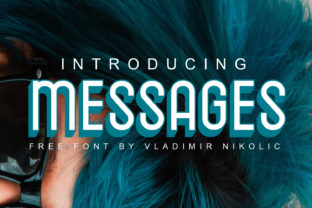
Messages: A Clean, Elegant Free Sans Serif Font for Modern Communication
Typography shapes how we interpret information. The right typeface can make a message feel trustworthy, approachable, or authoritative. In a world where digital communication dominates, finding a font that balances clarity with personality is no small task. Messages, created by Serbian designer Vladimir Nikolic, offers a refreshing solution. This neat, elegant free sans serif font is designed to bring warmth and readability to everything from mobile interfaces to print materials. Whether you are building a brand, designing a website, or preparing a presentation, Messages provides a versatile foundation that feels both contemporary and timeless.
This article explores what makes Messages stand out, where it excels, and how you can determine if it fits your next project. We will look at its design philosophy, practical applications, and the considerations that come with using a free font in professional work.
Understanding the Design of Messages
Vladimir Nikolic has crafted a typeface that feels intentionally understated. Messages avoids decorative flourishes in favor of clean, consistent letterforms. The result is a sans serif font that reads smoothly at small sizes while retaining character when scaled up for headlines.
The design draws on geometric principles but softens them with slightly rounded terminals. This combination gives Messages a friendly, approachable feel without sacrificing professionalism. The x-height—the height of lowercase letters relative to capitals—is generous, which improves legibility on screens. Letter spacing is carefully balanced to prevent crowding, even in dense paragraphs.
One of the most striking aspects of Messages is its neutrality. It does not scream for attention. Instead, it recedes into the background, letting content take center stage. This quality makes it especially valuable for user interfaces, long-form reading, and any context where the goal is clear communication rather than visual spectacle.
Key Characteristics of Messages
- Clean geometric forms with subtle rounding for warmth
- Generous x-height for improved screen legibility
- Balanced spacing that works well in both body text and headlines
- Neutral personality that adapts to diverse branding contexts
- Consistent stroke weight across all characters
- Full character set supporting multiple languages
These features make Messages a practical choice for designers who need reliability across mediums. It does not attempt to reinvent typography but rather refines familiar conventions into something quietly excellent.
Where Messages Shines: Practical Applications
Because Messages prioritizes clarity and neutrality, it fits naturally into several common use cases. Here are some scenarios where the font truly delivers value.
Digital Interfaces and Mobile Apps
User interfaces demand fonts that remain legible at small sizes while maintaining a clean appearance. Messages excels here. Its generous x-height and open counters—the enclosed spaces inside letters like "e" and "a"—ensure characters remain distinct even on compact screens. The rounded terminals add a touch of friendliness, which can reduce the sterile feel often associated with interface typography.
Consider a messaging app, a dashboard, or an e-commerce platform. Messages provides the readability users need to scan information quickly without visual fatigue. Its neutral tone also means it pairs well with accent fonts or brand colors without clashing.
Branding and Identity Work
Startups, small businesses, and creative professionals often seek typefaces that convey reliability without feeling corporate. Messages strikes that balance. Its clean lines suggest competence, while the subtle warmth in its curves hints at approachability. This makes it suitable for logos, business cards, and brand guidelines.
A local coffee shop, a freelance consultant, or a wellness brand could all use Messages as part of a cohesive identity. The font does not impose a specific mood, allowing the brand's own voice to come through. For designers, this flexibility reduces the need to switch typefaces when the brand evolves.
Presentations and Reports
Slides and documents benefit from consistent, readable type. Messages performs well in this setting because it maintains clarity at various sizes. Titles set in Messages look modern yet serious, while body text flows comfortably in longer paragraphs.
Whether you are preparing an investor pitch, a research summary, or an internal memo, Messages helps your content appear polished without distracting from the message itself. The font's even texture reduces visual noise, making data and key points easier to absorb.
Web and Print Collateral
Messages works across both digital and print mediums. On websites, it loads quickly as a web font and renders consistently across browsers. In print, its clean lines translate well to brochures, flyers, and stationery. The font's neutrality means it does not fight with images or other design elements, making layout decisions simpler.
For a real-world example, imagine a non-profit organization creating an annual report. Messages could handle the body text, while a more expressive font handles pull quotes. The result would be readable, professional, and accessible to a wide audience.
Strengths of Messages: Why Designers Choose It
Beyond its visual qualities, Messages offers several practical advantages that make it a compelling option for professionals and hobbyists alike.
- Free for personal and commercial use. You can use Messages in client projects, products, and publications without worrying about licensing fees. This removes a common barrier for freelancers and small businesses.
- Elegant simplicity. The font does not try to be trendy. It follows timeless design principles, which means it will not look dated in a few years. This longevity protects your design investment.
- Versatile weight and style options. Messages includes multiple weights, allowing you to build hierarchy within your layouts without switching typefaces. This consistency improves overall design cohesion.
- Optimized for screen readability. The font is tuned for digital use, with hinting that preserves clarity at low resolutions. This is especially important for mobile interfaces and web applications.
- Active community and support. Vladimir Nikolic maintains the font and offers updates, ensuring compatibility with evolving design tools and operating systems.
These strengths make Messages a reliable choice for projects where budget, readability, and professionalism matter most.
Considerations and Limitations
No font is perfect for every situation. While Messages excels in many areas, understanding its limitations helps you make an informed decision.
Limited expressive range. Because Messages is intentionally neutral, it may feel too plain for projects that need strong personality. A brand targeting a youthful, edgy audience might prefer a display font with more distinct character. Similarly, luxury brands seeking ornate elegance may find Messages too restrained.
Weight options. While Messages offers a decent range, it may not include the ultra-light or black weights that some designers need for complex typographic hierarchies. If your project relies on extreme contrast between thin and bold, you might need to supplement Messages with another typeface.
Language support. Messages covers a broad set of Latin-based languages, but if your project requires extended characters or non-Latin scripts (Cyrillic, Greek, CJK), you will need to verify coverage. Always check the character set before committing.
Perception of free fonts. Some clients or stakeholders may associate free fonts with lower quality, even when the design itself is excellent. If you are presenting a brand identity to a conservative client, be prepared to explain the rationale behind choosing Messages or consider a premium alternative.
These considerations do not diminish Messages' quality. They simply highlight contexts where another typeface might serve better. The key is matching the font to the project's needs rather than forcing a one-size-fits-all solution.
How to Evaluate Whether Messages Suits Your Project
Choosing a typeface is a decision that affects every piece of communication your brand or project produces. Here is a practical framework to determine if Messages is the right fit.
Step 1: Define Your Communication Goals
What tone do you want to convey? Messages leans toward friendly professionalism. If your brand voice is formal, authoritative, or playful, consider whether Messages aligns or if you need something more distinct.
Step 2: Consider Your Medium
Messages performs exceptionally well on screens. If your primary output is digital—websites, apps, presentations—it is a strong candidate. For print projects with very small text, test the font at actual size to confirm readability.
Step 3: Test With Your Audience
Run a simple legibility test with a sample of your target audience. Show them a paragraph set in Messages alongside another sans serif font. Ask which feels easier to read and more trustworthy. This real-world feedback often reveals preferences that specs alone cannot.
Step 4: Pair With Complementary Fonts
Messages pairs well with serif fonts for contrast or with geometric sans serifs for consistency. If you plan to use multiple typefaces, test combinations early. A strong pairing can elevate both fonts.
Step 5: Evaluate Licensing
Messages is free for personal and commercial use, which simplifies licensing. However, always download the font from the official source and review the license terms directly. This protects you from unexpected restrictions.
Real-World Scenarios: Messages in Action
To illustrate the font's versatility, here are three hypothetical but realistic projects where Messages would be an excellent choice.
Scenario 1: A mobile meditation app. The app needs a clean, calming interface. Messages' rounded terminals and generous spacing create a serene reading experience for guided scripts and timer screens. The neutral design does not compete with the app's soothing color palette.
Scenario 2: A boutique consulting firm's website. The firm wants to appear professional yet approachable. Messages handles the body text, while a slab serif font adds personality to headings. The combination feels credible without being stuffy.
Scenario 3: A university department's research journal. The journal needs a typeface that works for dense academic text while remaining readable in PDF form. Messages' clarity and even texture make it suitable for multi-column layouts and footnotes.
Each of these scenarios leverages Messages' strengths in different ways. The common thread is a need for reliability, clarity, and a quietly professional tone.
Conclusion
Messages by Vladimir Nikolic is more than just another free sans serif font. It is a thoughtfully crafted tool that brings elegance and readability to a wide range of projects. Its clean geometry, warm details, and practical licensing make it accessible to everyone from solo creators to established businesses.
While it may not suit projects demanding high expressiveness or extreme weight variation, Messages excels where clarity and professionalism matter most. If you are looking for a typeface that supports clear communication without drawing attention to itself, this font deserves a place in your toolbox.
Download Messages now, free for personal and commercial use. Whether you are designing an app, building a brand, or preparing your next presentation, let this neat, elegant typeface help your message come through clearly.