Wonderlicious: A Handcrafted Font That Deserves Better Than Common Mistakes
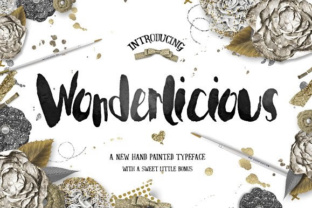
If you have spent any time browsing font catalogs recently, you have likely noticed a growing appreciation for handcrafted typography. Among the most charming offerings in this space is Wonderlicious, a beautiful handcrafted font created by Creativeqube. At first glance, its flowing lines and playful character make it an obvious choice for invitations, branding, or social media graphics. But like any specialized tool, Wonderlicious works best when you understand what it is designed for—and what it is not. Many people rush to download a font like this without considering a handful of practical details that can make the difference between a polished project and a frustrating outcome. This article walks through the most common missteps, misunderstandings, and overlooked details so you can use Wonderlicious with confidence and get the results you are actually after.
Mistaking Wonderlicious for a Versatile Workhorse
The most frequent mistake I see is treating a handcrafted display font as if it were a standard text face. Wonderlicious is not intended for long paragraphs, dense body copy, or small point sizes. Its charm comes from the very qualities that make it less readable in large blocks: irregular letterforms, decorative flourishes, and a distinct handmade rhythm. When you scale it down for a subheading or a caption, those details blur together and the font loses its personality.
How this affects your work: You end up with a design that feels crowded, hard to read, and frankly less attractive than the font deserves. Readers may squint, move on, or—worse—associate that discomfort with your brand or message.
Better approach: Reserve Wonderlicious for headlines, logos, short quotes, or any element where you want to make a visual statement. Pair it with a clean, neutral body font such as a simple sans-serif or a classic serif. For example, use Wonderlicious for a hero heading on a website and set your navigation and article text in a font like Open Sans or Lora. This gives the handmade font room to shine without overwhelming the reader.
If you absolutely need to use it in a smaller size, experiment with generous letter-spacing and lighter weights (if available) to maintain legibility. Always test the font at the actual size it will appear in your final medium.
Overlooking Licensing and What You Actually Get
Another surprisingly common oversight happens before you even download the font. Many people assume that buying or downloading a font grants unlimited use across all projects and platforms. With handcrafted fonts like Wonderlicious, licensing is rarely that simple. Creativeqube may offer different tiers: personal use, commercial use, web embedding, and extended licenses for things like app interfaces or merchandise.
What can go wrong: You purchase a personal license, use the font on a client website, and later discover you are in violation. At best, you pay for an upgrade. At worst, you face legal headaches and reputational damage. I have seen small business owners lose time and money because they assumed one license covered everything.
Practical advice: Before you buy, read the license terms carefully. Look for keywords like “desktop use,” “webfont,” “app embedding,” and “commercial projects.” If you are a freelancer or agency, a commercial license is typically required. If you plan to use Wonderlicious in a logo for a client, confirm whether that usage is covered or if you need an extended license. When in doubt, contact Creativeqube directly. They will appreciate your diligence, and you will avoid costly surprises.
Also, note what file formats you receive. Many handcrafted fonts include only OpenType or TrueType files. If you need variable fonts or web-specific formats like WOFF2, verify availability beforehand.
Pairing Wonderlicious Without a Plan
A handcrafted font has a strong personality, and that personality demands thoughtful companions. Pairing Wonderlicious with another decorative font is one of the quickest ways to create visual chaos. I have seen invitations where every line uses a different script or ornamental face—the result is a jumble of competing voices rather than a cohesive design.
Why it hurts your project: Your message gets lost in the noise. Instead of feeling charming, the design feels amateurish and overwhelming. Whether you are a blogger creating a handout or a marketer designing a landing page, clarity is your first priority.
Better approach: Choose one complementary font that contrasts with Wonderlicious in style but harmonizes in mood. A clean sans-serif like Montserrat or a simple serif like Merriweather works well because it provides visual rest. Use type pairing principles: contrast in weight, structure, and size. For instance, let Wonderlicious carry the headline in a larger size, and use the second font for subheadings, body text, and captions. Keep the color palette restrained so the typography does not fight with itself.
If you are designing a logo, test the font with at least two or three different supporting typefaces before committing. Print them side by side. Ask a colleague for a fresh eye. A small amount of upfront testing saves hours of rework later.
Downloading From the Wrong Sources
Handcrafted fonts are labor-intensive to create, and unfortunately they are also popular targets for unauthorized distribution. Downloading Wonderlicious from a free font aggregator or a third-party site that does not clearly credit Creativeqube is risky. You may end up with an incomplete or corrupted file, missing characters, or a version that lacks the full glyph set—such as ligatures, alternate letters, or special punctuation that make the font special.
Real consequences: You spend time installing the font, start designing, and discover that the “e” looks different from the preview, or that accented characters are missing. Your project stalls, and you waste effort troubleshooting something that could have been avoided. Worse, using an unauthorized copy may violate copyright, even if you did not intend to pirate the font.
How to avoid this: Always download Wonderlicious from the official Creativeqube store or from reputable foundries that list Creativeqube as the creator. Check the product page for sample glyphs, character maps, and user reviews. If the price seems too good to be true on a third-party site, it probably is. Paying a fair price for the official file ensures you get the full, tested version along with support and updates. It also respects the designer’s work, which helps keep high-quality handcrafted fonts available for everyone.
If you are on a tight budget, look for personal-use licenses or trial versions offered directly by the creator. Many font designers provide limited free versions so you can evaluate the font before purchasing a commercial license.
Forgetting to Test Across Mediums
A font that looks stunning on your screen at 72 dpi may not translate well to a printed invitation, a billboard, or a mobile device. Handcrafted details in Wonderlicious—thin strokes, decorative swashes, or uneven baselines—can behave differently depending on the output medium. I have seen otherwise beautiful designs lose their charm when printed on uncoated paper or displayed on low-resolution screens.
What is at stake: The time and money you invested in a design project can feel wasted when the final result looks muddy, broken, or inconsistent. Your audience will notice even if they cannot name why something feels off.
Practical testing strategy: Before finalizing any design that uses Wonderlicious, test it in the exact environment where it will appear. Print a sample at actual size on the paper you plan to use. View it on a mobile screen, a tablet, and a laptop at different brightness levels. Check legibility at the intended viewing distance. If you are embedding the font on a website, use web-safe fallback fonts and verify that the font loads correctly in major browsers (Chrome, Safari, Firefox, Edge).
For print projects, pay attention to ink bleed and paper texture. A heavy, rough paper may cause fine flourishes to fill in. For digital projects, ensure that font files are subset and compressed so they load quickly without sacrificing quality. If you are using a decorative alternate glyph, confirm that the software you use (like Canva, Adobe, or Figma) supports OpenType features.
One extra tip: Always keep a PDF or image backup of your design in case the font is not available for future edits. This is especially important when collaborating with others who may not have the font installed.
Making Informed Decisions About Wonderlicious
Choosing a font like Wonderlicious is an exciting step in any creative project. Its handcrafted nature brings warmth, authenticity, and a personal touch that standard fonts rarely capture. But the key to a successful outcome lies in the details: understanding its proper use, respecting its licensing, pairing it thoughtfully, obtaining it legitimately, and testing it in context.
When you avoid the common mistakes outlined here, you free yourself to focus on what matters most—communicating your message effectively and delighting your audience. Whether you are a freelancer designing a logo, a marketer creating a campaign, or a hobbyist working on a personal project, Wonderlicious can be a wonderful addition to your toolkit when used with intention.
Take a few extra minutes to verify the license, choose a complementary pair, and test the font in its final environment. That small investment of care will repay itself many times over in the quality and professionalism of your finished work. And you will enjoy using the font a lot more when you know you have set it up for success.